
Vacancies, applicants, documents, approvals and onboarding tasks are often handled across email, spreadsheets and separate applications before an employee ever reaches Business Central
HR Management 365
Complete HR Management for Microsoft Dynamics 365 Business Central
Business Central manages finance, projects and operations. HRManagement365 adds the complete employee lifecycle — without introducing another disconnected HR platform.
Built on the Microsoft platform you already use
HR Management 365
Business Central
Power Platform
Teams
Outlook
Power BI
Microsoft 365
Business Central includes core HR records. But managing the complete employee lifecycle needs more.
Microsoft Business Central supports employee records, contracts, qualifications, contacts and absence registration. For organisations that need recruitment, onboarding, self-service, time management, talent, performance and structured HR workflows, HRManagement365 extends Business Central within the Microsoft ecosystem.
1
Recruitment and onboarding sit outside Business Central
2
Employee changes are entered more than once
Employee, project, skills and time information can end up being maintained across separate systems, creating duplicate administration and uncertainty over which record is authoritative.
3
Managers rely on HR for routine answers
Managers and employees need HR for routine requests, documents, absence information and approvals because the processes are not available through a connected self-service experience.
4
Workforce reporting takes too long
HR and finance reconcile different sources before they can confidently answer questions about people, absence, time, skills, organisational change or project activity.
5
HR becomes another technology island
A separate HR platform can mean another data model, security model, integration layer and administration burden alongside your existing Microsoft environment.
Don't replace Business Central. Complete it.
Keep Business Central responsible for the ERP processes it already handles well. Use HRManagement365 powered by Hubdrive for the employee lifecycle, and connect the two where HR information needs to support projects, resources, time or downstream financial processes.
One employee lifecycle.
Clear system ownership.
Controlled information from first vacancy to final working day.
Business Central + HRManagement365
Extend Business Central into complete HR management
Microsoft Dynamics 365 Business Central includes useful core employee and absence functionality. HRManagement365 powered by Hubdrive extends that foundation across the wider employee lifecycle.
Capability
Microsoft Dynamics 365
Business Central
Business Central
Standard functionality
HRManagement365
Powered by Hubdrive
Employee records
Microsoft Dynamics 365 Business CentralStandard functionality
✓Core employee information
HRManagement365Powered by Hubdrive
✓Extended employee lifecycle and HR record
Contracts & qualifications
Microsoft Dynamics 365 Business CentralStandard functionality
✓Available
HRManagement365Powered by Hubdrive
✓Integrated into the wider HR record
Absence
Microsoft Dynamics 365 Business CentralStandard functionality
✓Absence registration and analysis
HRManagement365Powered by Hubdrive
✓Leave requests, approvals, balances and workflows
Recruitment & applicant tracking
Microsoft Dynamics 365 Business CentralStandard functionality
–Not a standard end-to-end HR recruitment process
HRManagement365Powered by Hubdrive
✓Vacancy, applicant and recruitment management
Structured onboarding
Microsoft Dynamics 365 Business CentralStandard functionality
–Not a standard complete HR onboarding lifecycle
HRManagement365Powered by Hubdrive
✓Controlled employee onboarding processes
Employee & manager self-service
Microsoft Dynamics 365 Business CentralStandard functionality
–General Business Central user experience
HRManagement365Powered by Hubdrive
✓HR-focused employee and manager self-service
Time & workforce management
Microsoft Dynamics 365 Business CentralStandard functionality
✓Project and resource time-sheet capabilities
HRManagement365Powered by Hubdrive
✓HR time, attendance and approval processes
Performance & talent
Microsoft Dynamics 365 Business CentralStandard functionality
–Not a standard complete HR talent-management process
HRManagement365Powered by Hubdrive
✓Performance, objectives, skills and development
HR workflows
Microsoft Dynamics 365 Business CentralStandard functionality
✓General Business Central workflow capabilities
HRManagement365Powered by Hubdrive
✓HR-specific lifecycle workflows and approvals
Business Central integration
Microsoft Dynamics 365 Business CentralStandard functionality
✓Native Microsoft ERP platform
HRManagement365Powered by Hubdrive
✓Defined Hubdrive integration with Business Central
Employee integration
Microsoft Dynamics 365 Business CentralStandard functionality
–—
HRManagement365Powered by Hubdrive
✓Defined employee mapping
Skills integration
Microsoft Dynamics 365 Business CentralStandard functionality
–—
HRManagement365Powered by Hubdrive
✓Defined skills mapping
Projects / processes integration
Microsoft Dynamics 365 Business CentralStandard functionality
✓Projects and operational processes
HRManagement365Powered by Hubdrive
✓Projects / processes can be connected to HR
Timesheet integration
Microsoft Dynamics 365 Business CentralStandard functionality
✓Business Central project time sheets
HRManagement365Powered by Hubdrive
✓HR time entry → approval → Business Central
Power Platform extensibility
Microsoft Dynamics 365 Business CentralStandard functionality
✓Power Platform and Dataverse integration
HRManagement365Powered by Hubdrive
✓HR processes extended using Microsoft technology
Power BI / Fabric reporting
Microsoft Dynamics 365 Business CentralStandard functionality
✓Microsoft analytics ecosystem
HRManagement365Powered by Hubdrive
✓Workforce reporting within the Microsoft data estate
↗
Don't replace Business Central. Complete it.
Keep Business Central responsible for the ERP processes it already handles well. Use HRManagement365 powered by Hubdrive for the employee lifecycle, with defined integration where HR and ERP processes meet.
Add the HR capabilities Business Central wasn't designed to provide
HRManagement365 powered by Hubdrive provides the HR application layer while Business Central continues to manage the financial, project and operational processes appropriate to your organisation.
How HRManagement365 connects to Business Central

Hubdrive’s Business Central integration uses Microsoft Dataverse technology and predefined mappings to connect HR and ERP processes. Microsoft Business Central data can be exposed through Dataverse virtual tables without duplicating the underlying Business Central record.
Hubdrive provides mapped integration for Employees, Skills, Projects/Processes and Time Sheets.
A practical example: Business Central projects → HR timesheets → Business Central
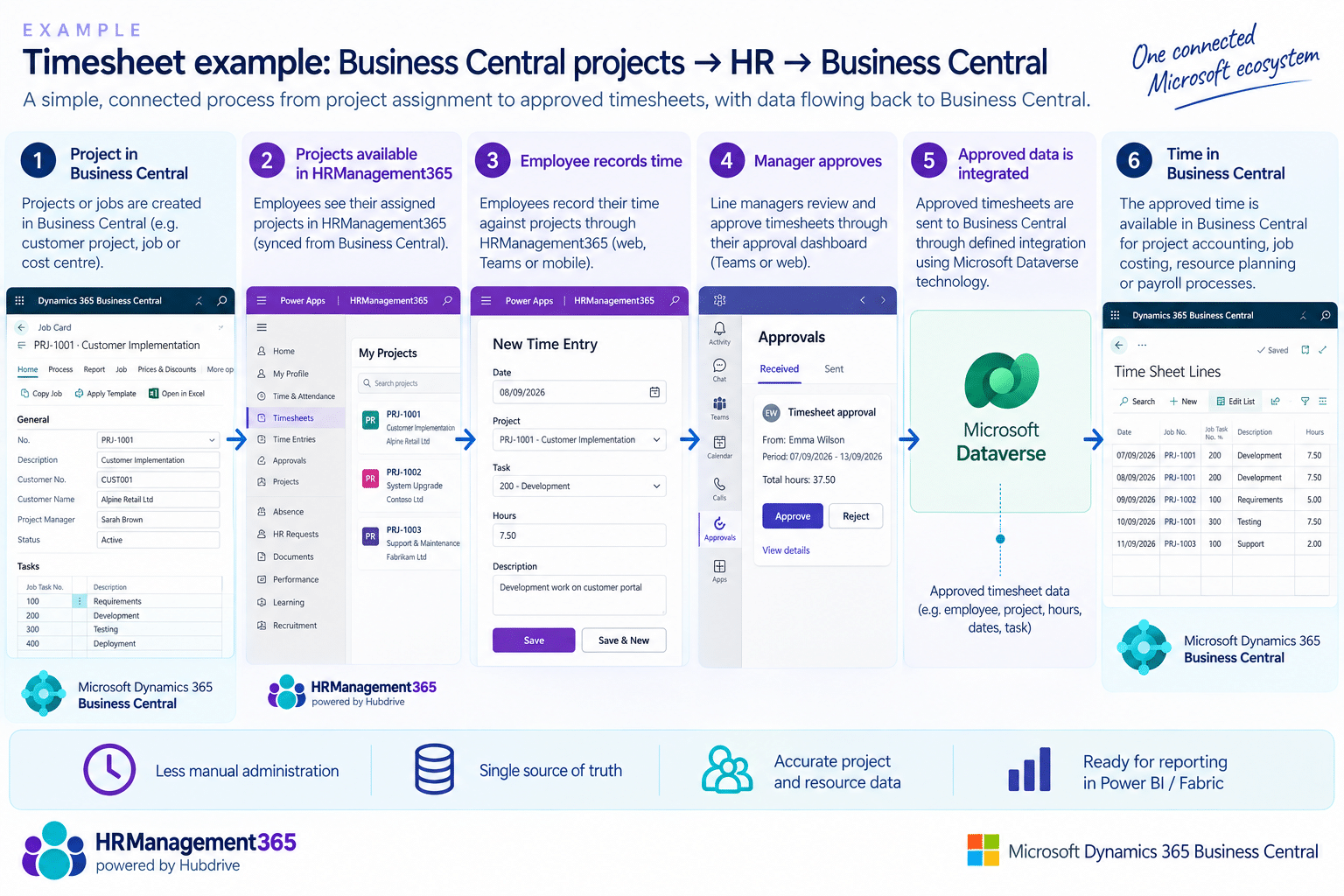
Projects or processes assigned in Business Central can be reflected in HRManagement365.
Employees record their time through HR self-service, managers approve the timesheet, and the approved information can then return to Business Central for downstream ERP processing.
Business Central data doesn't have to be duplicated just to make it available to Power Platform
Microsoft’s Business Central virtual table technology can expose Business Central data through Dataverse while the data itself remains in Business Central.
Give employees and managers a simpler way to complete HR work
Employees update and request directly
Reduce routine emails by giving employees a clear place for personal information, documents and HR requests.
Managers see their team and required actions
Surface approvals, starter tasks, absence and employee information in a role-appropriate view.
HR keeps control of policy and workflow
Define what users can see, what requires approval and where exceptions return for review.

Keep HR inside the Microsoft ecosystem your business already knows
HR systems should feel like part of the digital workplace your organisation already uses, not another isolated HR application with a separate way of working.
Business Central
Connect defined HR information with Business Central using Hubdrive’s Business Central integration, including mapped Employees, Skills, Projects/Processes and Time Sheets.
Microsoft Teams and Outlook
Bring relevant tasks, notifications and communications closer to the tools employees and managers already use.
Power BI
Turn workforce information into clearer reporting for HR, finance and leadership.
SharePoint and documents
Support controlled employee documents, templates and records within the wider Microsoft content environment.
Power Platform
Extend HR and ERP processes using Power Apps, Power Automate and Dataverse rather than introducing a separate proprietary development platform.
Microsoft security and identity
Align access, roles and governance with the Microsoft environment, subject to the agreed solution design and configuration.
Experience layer
Microsoft Teams
Outlook
Browser
Employee self-service
Manager self-service
HRManagement365 product layer
Employee records
HR workflows
Documents
Leave & time
Talent & performance
Training
Reporting
Microsoft platform & business systems
Power Platform
Microsoft 365
SharePoint
Power BI
Business Central
Finance & Operations
Connect HR processes to the Microsoft tools your organisation already uses.
HRManagement365 provides the HR product layer while supporting defined connections with Microsoft productivity and business systems.
Clear process ownership
Define which system owns each stage, action and record.
Controlled connections
Move approved information through integrations rather than manual re-entry.
Role-based experience
Present relevant information and actions to each user group.
Configurable workflows
Adapt approvals, responsibilities and stages to your requirements.
Frequently Asked Questions
HR Management 365 gives HR teams, managers and business leaders the tools and information they need inside the Microsoft environment they already use.
How does information move into Business Central?
HRManagement365 powered by Hubdrive uses the Business Central integration and defined mappings to connect the two applications. Hubdrive currently documents mapped integration for Employees, Skills, Projects/Processes and Time Sheets. Microsoft Dataverse virtual-table technology can also expose Business Central data to Power Platform without copying the underlying Business Central record.
Will the connection create duplicate employee records?
The integration is designed around defined system ownership rather than uncontrolled duplicate records. Where Business Central data is accessed through Microsoft virtual tables, the underlying data remains in Business Central rather than being copied into Dataverse. During implementation we define which application owns each relevant record and process.
Can employees and managers use self-service?
Yes. Employees and managers can complete HR work through familiar Microsoft experiences including browser, mobile, Teams and Outlook, depending on the configured process.
How do Teams, Outlook and Power BI fit?
Power BI and Microsoft Fabric can support workforce analytics and reporting alongside the wider Microsoft data estate.
How are licensing, payroll and multiple companies handled?
HRManagement365 offers role-based licensing and supports payroll preparation, different employers and varied company structures. We confirm the right configuration based on your Microsoft environment, payroll arrangements and operating model.
What will a tailored demo cover?
Your demo will focus on a real process that matters to your organisation. We can follow the journey from HRManagement365 through approvals and self-service to the relevant Business Central hand-off.
Does Business Central already include HR?
Business Central includes core Human Resources functionality. Microsoft documents employee records such as contacts, contracts, confidential information and qualifications, together with employee absence registration and analysis. HRManagement365 powered by Hubdrive extends this into a broader employee lifecycle including recruiting, onboarding, workforce management, talent management and employee/manager self-service.
Does HRManagement365 replace Business Central?
No. The objective is to extend your existing Microsoft Business Central strategy, not replace it. Business Central remains responsible for the ERP processes you choose to manage there, while HRManagement365 provides the specialist HR lifecycle and connects the two where required.
Ready to see HR Management 365 in action?
Book a practical demonstration based on your Microsoft environment and current HR processes.