ALREADY INVESTED IN MICROSOFT?
DON'T ADD ANOTHER DISCONNECTED HR SYSTEM

Complete HR for the Microsoft environment you already use.

Don’t add another disconnected HR platform.

HRManagement365 gives you complete hire-to-retire HR on Microsoft Power Platform — working with Microsoft 365, connecting with Business Central, or extending Dynamics 365 F&O HR.

Powered by Hubdrive and enhanced by our own add-ons, integrations and Microsoft expertise.

One HR solution. Your Microsoft platform. Adapted around the way your organisation works.

See HRManagement365 in your Microsoft environment
Explore how it works

Keep the Microsoft investment you already have. Add the HR capability you need.

Built on Microsoft. Delivered by experienced Dynamics specialists.
Hubdrive logo with four colorful puzzle pieces (green, red, orange, blue) beside the word Hubdrive.
F1Group logo featuring multicolored oval shapes to the left of the 'F1Group' wordmark.

MICROSOFT BY DESIGN

Power Platform • Microsoft 365 • Dynamics

COMPLETE HR

Recruitment to offboarding

ADAPTABLE

Configure it yourself, with us, or through us

UK / EU SOLUTION PARTNER

Addons • Implementation • Development • Support

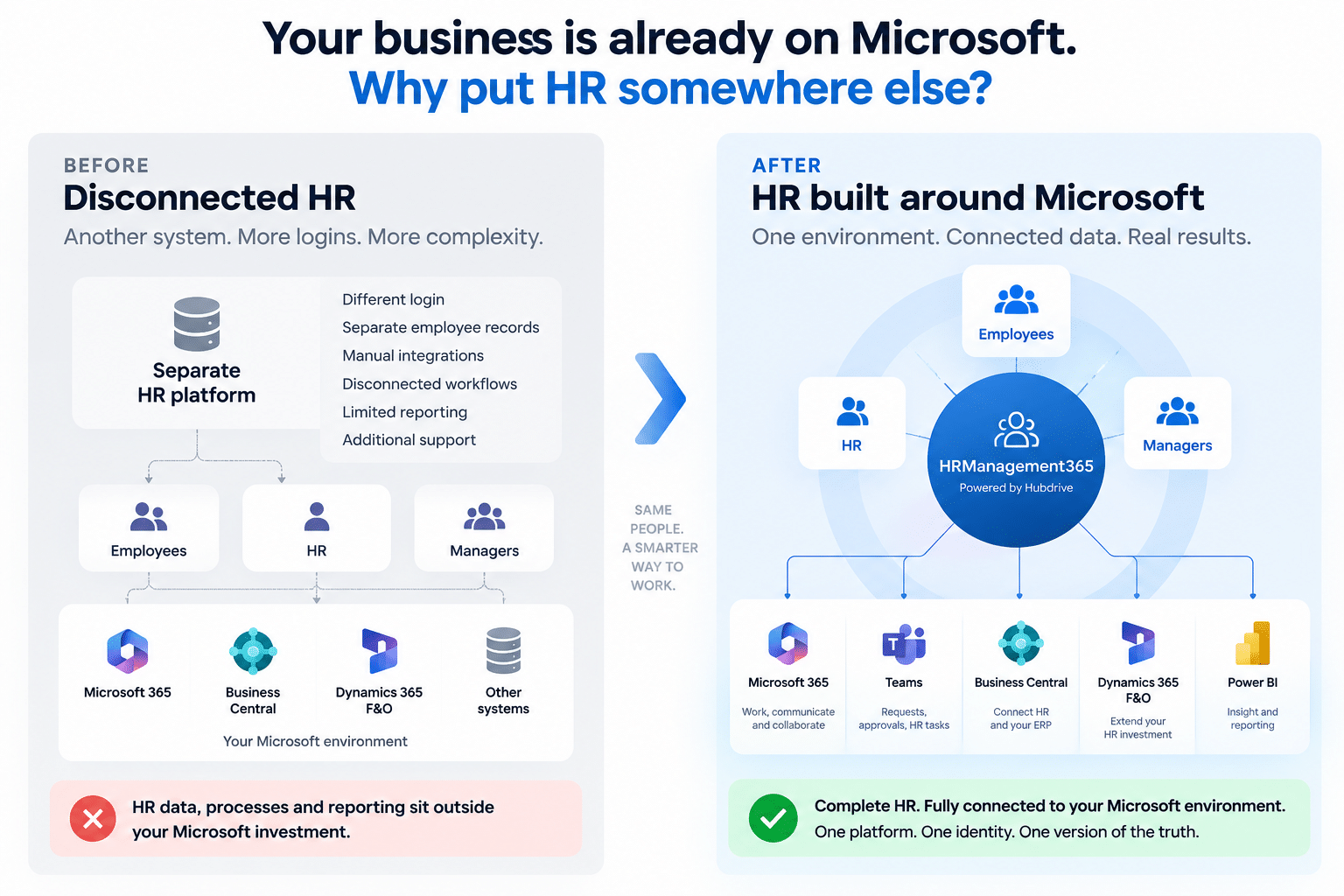
Your business is already on Microsoft. Why put HR somewhere else?

If Microsoft already runs your productivity, finance, operations, reporting or business applications, introducing a completely separate HR technology stack can create another set of data, processes, integrations and administration.

HRManagement365 takes a different approach: add the HR capability you need around the Microsoft environment you already have.

1

COMPLETE HR

From candidate to leaver. One connected employee lifecycle.

Manage recruitment, onboarding, employee administration, documents, leave, time, performance, training, expenses and offboarding through one modular HR solution.

Start where the pressure is greatest and add further HR areas as your requirements develop.

2

MICROSOFT BY DESIGN

HRManagement365 uses Microsoft Power Platform and works across the wider Microsoft environment,

including Microsoft 365, Teams, Outlook, Business Central, Finance & Operations, Power Automate and Power BI where applicable.

Keep HR closer to the identity, security, applications, automation and reporting technologies already used across your organisation.

3

YOUR HR. YOUR PROCESSES.

Illustration of a person at a laptop with a blue gear icon, representing IT support or software setup

Adapt it yourself

Add or change fields, forms and views, adapt workflows and approvals, create dashboards and automate appropriate processes.

Two people discuss ideas in a circular illustration, featuring a lightbulb and chat bubble with an HR 365 badge

Do it together

Use your internal Microsoft capability while we help with solution design, governance, more involved workflows and technical guidance.

Illustration of a person in a suit using a laptop with a checklist showing three completed items

Or let us handle it

We can configure the solution, build integrations, create additional Power Apps, develop specialist functionality and produce the dashboards and Power BI reporting your organisation needs.

Which Microsoft environment?

One HR solution. Different Microsoft starting points.

HR Management 365 powered by Hubdrive is available across Microsoft 365, Power Platform, Business Central and Finance & Operations. 

Your existing Microsoft environment, HR requirements and target architecture determine the most appropriate configuration and integration approach.

Logo collage of three data analytics icons inside a white circle: green-blue ribbon, purple-blue hexagon, and yellow bar chart

MICROSOFT 365 + POWER PLATFORM

Complete HR on the Microsoft business platform.

For organisations wanting comprehensive HR without requiring Business Central or F&O.

Network connection icon with a central node connected to four outer nodes

MICROSOFT BUSINESS CENTRAL (BC)

Add complete HR alongside Business Central

For organisations already using BC for finance and operations.

Logo: purple diamond made of four overlapping squares inside a glowing white circle badge

MICROSOFT FINANCE & OPERATIONS (F&O)

Extend your Dynamics 365 HR investment

For organisations using Dynamics 365 Human Resources within F&O.

Diagram of an integration stack: Dynamics 365 Business Central at the top with four modules (Employee, Skills, Projects/Processes, Time Sheets) connected by arrows to Microsoft Dataverse in the middle, then to HR Management 365 powered by Hubdrive at the bottom.

ALREADY USING BUSINESS CENTRAL?

Business Central runs your business. Why is HR still disconnected?

HRManagement365 is powered by Hubdrive and enhanced with our own add-ons, extensions, integrations and customisations.

Alongside the core HR platform, the solution includes additional functionality we have developed for common HR lifecycle requirements, together with specialist consultancy, implementation, configuration and ongoing support.

Hubdrive’s Business Central integration uses Microsoft Dataverse virtual tables to make Business Central data available to the Power Platform while retaining a single stored copy of the data.

HR Management 365 powered by Hubdrive provides complete HR management on Microsoft Power Platform and is available for Microsoft 365, Power Platform, Business Central and Finance & Operations.

For Business Central customers, Hubdrive extends the ERP with professional HR management.

For Dynamics 365 Human Resources in F&O, Hubdrive provides dedicated HR Power Extensions.

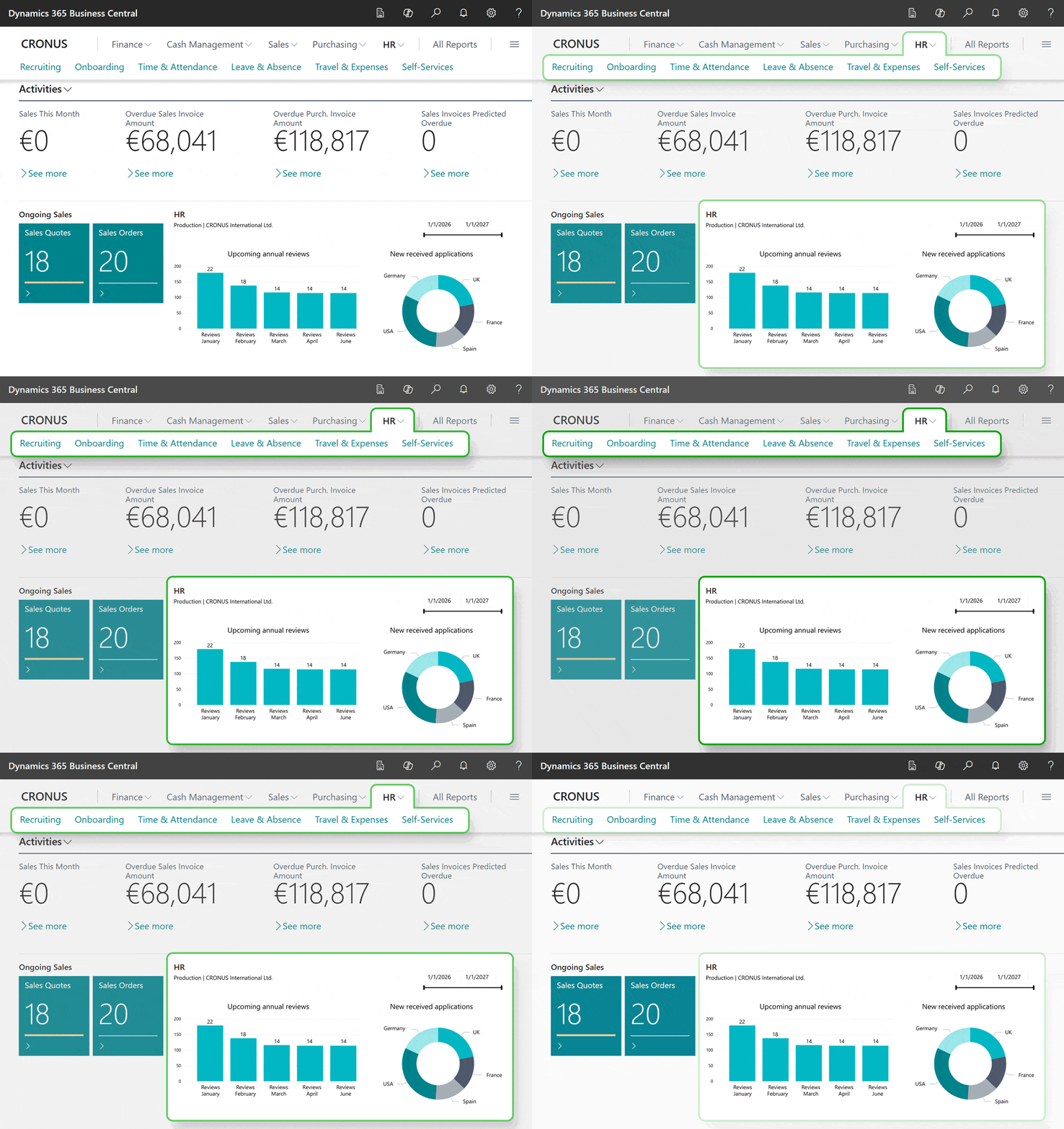
CRONUS HR dashboard showing key metrics: overdue invoices totals, sales activity tiles, ongoing sales, upcoming reviews, and a donut chart of new applications by country.

One solution across the employee lifecycle

HR Management 365 powered by Hubdrive provides modular HR capabilities across recruiting, employee administration, workforce management, talent management and employee self-services.

Recruiting & onboarding

Manage vacancies, applicants, recruiting processes and onboarding in one connected solution, with standardised onboarding and offboarding processes available through templates.

Digital personnel file

Maintain employee and employment information together with relevant HR details, documents and personnel processes in the digital employee file.

Leave and absence

Give employees an easy way to request leave while managers approve, track and plan absences with clear, up-to-date team visibility.

Time and attendance

Capture working hours, overtime and attendance accurately, with connected approvals and reliable data for payroll and workforce planning.

Talent & performance

Support employee development with performance reviews, target agreements, skills management, 360° feedback, training and certificates. Connect performance, skills and development activity within the employee’s HR record.

Training & eLearning

Track skills, qualifications, certifications and learning requirements, while giving employees and managers clear development plans.

Employee & manager self-service

Let employees and managers update information, submit requests and complete everyday HR tasks directly within familiar Microsoft applications.

Travel & expenses

Manage business travel from request and approval through to receipt entry and expense calculation. Employees can access travel information, submit receipts and expenses through self-service, with approval processes involving managers where required.

Reporting & analytics

Use Microsoft Power BI and Microsoft Fabric capabilities for analytics and reporting across your Microsoft environment.

Work where your people already work.

The solution is built on Microsoft Power Platform and integrates into the Microsoft cloud infrastructure organisations already use.

Employees and managers can complete HR tasks through familiar Microsoft 365 experiences, while Power Automate, Power Apps and Power BI provide tools for automation, extension and reporting.

Abstract geometric composition in blue and purple tones with overlapping rounded rectangles and circles on a black background.

Requests • approvals • HR tasks

Outlook mail icon: a blue square with a white 'O' over an overlapping envelope, representing Microsoft Outlook

Notifications • reminders • HR actions

Abstract blue-to-purple gradient with curved translucent panels suggesting a modern, tech-inspired background.

Approvals • notifications • process automation

Abstract graphic with three overlapping yellow-gold rounded bars of increasing height on black background.

HR dashboards • management reporting

Abstract geometric logo with overlapping rounded diamonds in purple and pink colors.

Additional apps and role-specific experiences

Decorative abstract gradient ribbon in blue, purple, and pink curving across a green background.

Supported HR self-service and Microsoft AI scenarios

One connected HR platform. Clear benefits for every role.

HR Management 365 gives HR teams, managers and business leaders the tools and information they need inside the Microsoft environment they already use.

For HR Teams

Less chasing. More control.

  • Reduce repetitive administration

  • Put routine requests through defined workflows

  • Give employees and managers more self-service

  • See HR information without stitching together spreadsheets

For Managers

Fewer emails. Faster decisions.

  • Handle leave and other approvals

  • Access relevant employee and team information

  • Complete performance and development processes

  • Use browser, smartphone or supported Microsoft 365 experiences

For Finance, IT & Business Leaders

Make greater use of your existing Microsoft platform and infrastructure rather than introducing an isolated HR technology stack.

  • Connect defined employee, skills, project/process and timesheet information with Business Central

  • Build on existing Microsoft identity and cloud infrastructure

  • Use Power Platform for configuration and automation

  • Use Microsoft reporting technology for analytics

Microsoft Platform Routes
1

Microsoft 365 • Power Platform • Business Central • F&O

HR Modules
1

Ready to see HR Management 365 in action?

Show us your current Microsoft environment and the HR processes you want to improve. We’ll demonstrate the relevant capabilities and, where applicable, how they fit with Business Central, Microsoft 365 or Dynamics 365 Human Resources in F&O.

See HRManagement365 in action

Client Testimonials

Common Questions

Does HRManagement365 replace Business Central?

No. Hubdrive extends Business Central with professional HR management while Business Central continues to provide its core ERP capabilities across finance, sales, service, projects, supply chain and operations.