
HRManagement365 vs Personio: You have already invested in Microsoft. Should your HR platform be part of that investment?
Personio and HRManagement365 can both support substantial HR processes. For organisations already using Microsoft 365, Power Platform, Dynamics 365, Business Central or Finance & Operations, however, the buying decision is bigger than an HR feature checklist.
It is also an architecture decision: do you connect a separate HR SaaS platform to Microsoft where needed, or choose an HR platform designed to participate in the Microsoft environment your organisation already governs?
Both manage HR. The biggest difference is what sits around HR.
A dedicated cloud HR platform
Personio currently positions Core HR as the foundation of its platform, with onboarding, time tracking, absence management, People Analytics, workflow automation, documents and e-signatures. It also offers additional applications including recruiting and performance & development.
Personio also connects to external systems through a marketplace containing more than 200 integrations and supports Microsoft services including Teams and Microsoft Entra ID.
HR designed around a Microsoft strategy
HRManagement365 covers the employee lifecycle from recruitment and onboarding through employee records, documents, leave, time, performance, training, self-service and reporting.
Its strategic difference is the Microsoft environment around those HR processes: Power Platform, Microsoft 365, Power Apps, Power Automate, Power BI and defined Dynamics scenarios including Business Central and Finance & Operations.
HRManagement365 vs Personio: where the approaches differ
This table avoids simplistic ticks and crosses. In several areas both products have capability, but the delivery model and surrounding architecture differ.
| Area | HRManagement365 powered by Hubdrive | Personio |
|---|---|---|
| Core HR | Broad employee-lifecycle HR with employee records, documents and controlled processes. | Strong Core HR platform with central people data, documents, time, absence, workflows and analytics. |
| Recruitment | Recruitment and onboarding form part of the connected employee lifecycle. | Dedicated recruiting application with candidate management and hiring workflows. |
| Onboarding | Structured onboarding/offboarding connected to HR records and Microsoft workflow options. | Structured onboarding with templates, tasks, reminders and workflow automation. |
| Leave & absence | Employee requests, manager approvals, balances, records and downstream Microsoft scenarios. | Native absence management with requests, balances, approvals and calendars. |
| Time tracking | Working-time and attendance processes with connected approval and downstream use. | Native time tracking with web/mobile and workflow capability. |
| Performance & development | Performance, objectives, skills, feedback, training and development records. | Dedicated Performance & Development application with reviews, goals, feedback and competencies. |
| Workflow automation | HR workflows plus Power Automate extensibility where processes cross application boundaries. | Strong no-code Workflow Builder and native HR automation inside Personio. |
| People analytics | Microsoft-aligned reporting approach, including Power BI/Fabric options. | Strong native People Analytics with templated and customised reports. |
| Microsoft Teams | Teams sits within the wider Microsoft user-experience proposition for relevant HR activity. | Official Teams integration publishes Personio updates such as time off, birthdays, anniversaries and new employees. |
| Microsoft identity | Designed around the Microsoft environment and identity/governance model. | Supports Microsoft Entra ID SSO and an official Personio-to-Entra employee synchronisation integration. |
| Microsoft 365 | Central strategic proposition across identity, experience, workflow and reporting. | Selected Microsoft integrations are available; Personio remains its own application platform. |
| Business Central | Dedicated Business Central proposition using Microsoft-supported integration patterns. | Exact Business Central requirements should be validated against Personio's marketplace/API options and the required process. |
| Dynamics 365 / F&O | Dedicated Microsoft Dynamics positioning, including defined Finance & Operations scenarios. | Exact Dynamics requirements should be validated through available integrations/APIs rather than assumed. |
| Power Platform | Part of the solution architecture. | Can connect externally; Power Platform is not the underlying Personio application platform. |
| Dataverse | Part of the wider Microsoft data/application architecture. | Personio uses its own application/data architecture. |
| Power Apps | Available as an extension route for appropriate organisation-specific applications. | Extension beyond product configuration generally relies on Personio integrations/APIs and external applications. |
| Power Automate | Can extend cross-system workflows around HR and Microsoft business applications. | Personio provides its own workflow automation; Microsoft automation requires an integration design. |
| Power BI | Natural option where Power BI is already the organisation's reporting standard. | Personio provides native People Analytics; external BI requirements need separate design. |
| Extensibility | Configuration plus Microsoft low-code and specialist development where justified. | Configuration, Workflow Builder, marketplace integrations and APIs. |
| Best strategic fit | Particularly strong for organisations with a substantial Microsoft strategy. | Particularly strong for organisations wanting a dedicated European HR SaaS platform. |
The question is bigger than “does it have the HR feature?”
Both platforms can centralise employee information, automate HR work, manage absence, support onboarding and provide reporting. A long feature list therefore does not necessarily reveal the most important difference for a Microsoft-first organisation.
Add a dedicated HR platform
Run HR in Personio and connect Microsoft or other business applications where required through marketplace integrations, supported connectors or APIs.
- Dedicated HR application experience
- Strong native HR workflow automation
- Large integration marketplace
- Strong native People Analytics
Make HR part of the Microsoft environment
Use HRManagement365 as the HR product layer while Microsoft technologies participate in identity, data, workflow, reporting, business applications and extension scenarios.
- Power Platform-aligned architecture
- Defined Business Central and Dynamics scenarios
- Power Apps and Power Automate extension options
- Power BI reporting route
You are not choosing HR software in a vacuum.
Organisations often spend years building Microsoft skills, governance, identity, reporting, automation and business applications. The HR decision should consider whether that investment can create additional value.




Reuse skills
If your teams already build with Power Platform or report with Power BI, the HR architecture can make those skills relevant to HR requirements.
Reduce avoidable silos
Every new application boundary creates decisions about ownership, integration, monitoring, identity and support. Those boundaries should exist for a reason.
Connect processes
Joiners, leavers, time, approvals and organisational changes often affect IT, finance and operations—not just HR.
Integration with Microsoft is useful. Architectural alignment is a different question.
Dedicated HR platform connected to Microsoft
Personio's official Microsoft integrations are real and useful. The architectural question is how many connections your target operating model needs and who will own them.
HR inside a Microsoft-aligned application environment
For Microsoft-first organisations, the benefit is the ability to design HR alongside the application, workflow and reporting technologies already in use.
Personio is not a rigid employee database.
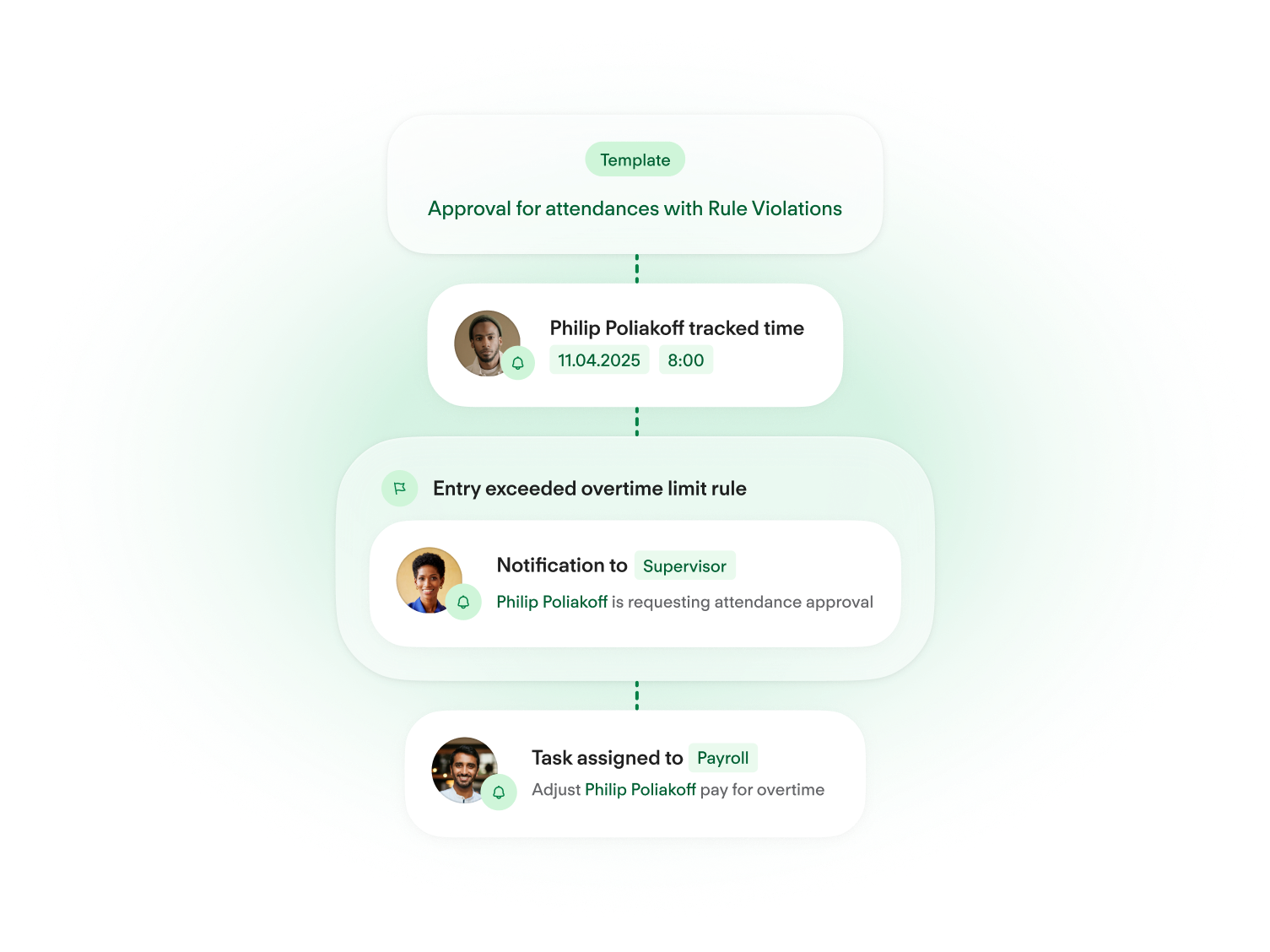
Personio provides a no-code Workflow Builder, templates, approvals, notifications, task management and monitoring. That is a genuine strength for organisations wanting to automate HR processes inside the Personio environment.
The comparison becomes more interesting when the workflow leaves HR. If a new starter process also needs actions in Microsoft identity, Business Central, Power Apps, Power BI or another Microsoft service, the surrounding automation platform matters.
Already using Business Central? The HR decision becomes an ERP architecture decision.
Business Central can already participate in Microsoft Power Apps, Power Automate, Power BI and Dataverse integration patterns. HR software therefore needs to be evaluated against the wider ERP environment—not only against an HR checklist.
HRManagement365 for Business Central customers
HRManagement365 has a dedicated Business Central proposition. The objective is not to replace Business Central, but to add complete HR capability while defining which system owns each process and data set.
For supported scenarios, Microsoft Dataverse and Power Platform patterns can be used to make defined information available across the architecture without treating every requirement as a bespoke point-to-point integration.
Personio with Business Central
Personio provides APIs and a large integration ecosystem, so a Business Central connection should not be dismissed. However, the exact required process should be demonstrated and scoped.
Ask which integration route is used, which system owns each field, how failures are monitored and who supports the interface when either product changes.
Keep system ownership explicit
For Dynamics organisations, the decision should define where employee, finance and operational information belongs. HRManagement365 is specifically positioned around Dynamics and Power Platform; Personio's exact Dynamics requirement should be demonstrated through its integration/API model.
Extend where the process gap exists
Where F&O already owns worker or operational information, the objective should be controlled coexistence. HRManagement365 can be evaluated around defined HR process gaps rather than automatically duplicating existing ERP capability.
Compare where work actually happens
Personio provides Microsoft integrations and its own user experience. HRManagement365 is designed around familiar Microsoft experiences. Ask both suppliers to demonstrate the same employee journey and count the systems, screens and context switches.
Configuring HR software and extending a business platform are not the same commercial proposition.
Personio: configure, automate, integrate
- Use standard Personio functionality.
- Configure fields, permissions and policies.
- Use Workflow Builder for HR automation.
- Use marketplace integrations where available.
- Use APIs/external development for additional integration scenarios where supported.
HRManagement365: configure, then use Microsoft extension routes where justified
- Use standard HRManagement365 functionality.
- Configure fields, forms, lists and workflows.
- Use Power Automate for appropriate process automation.
- Use Power Apps for appropriate organisation-specific applications.
- Use Power BI for reporting and specialist development for more complex requirements.
This is not a claim of unlimited customisation. Licensing, security, governance, support, upgradeability and implementation effort still matter. The advantage is having the wider Microsoft low-code environment available when standard HR configuration is not enough.
Personio has strong native analytics. HRManagement365 changes the reporting question.
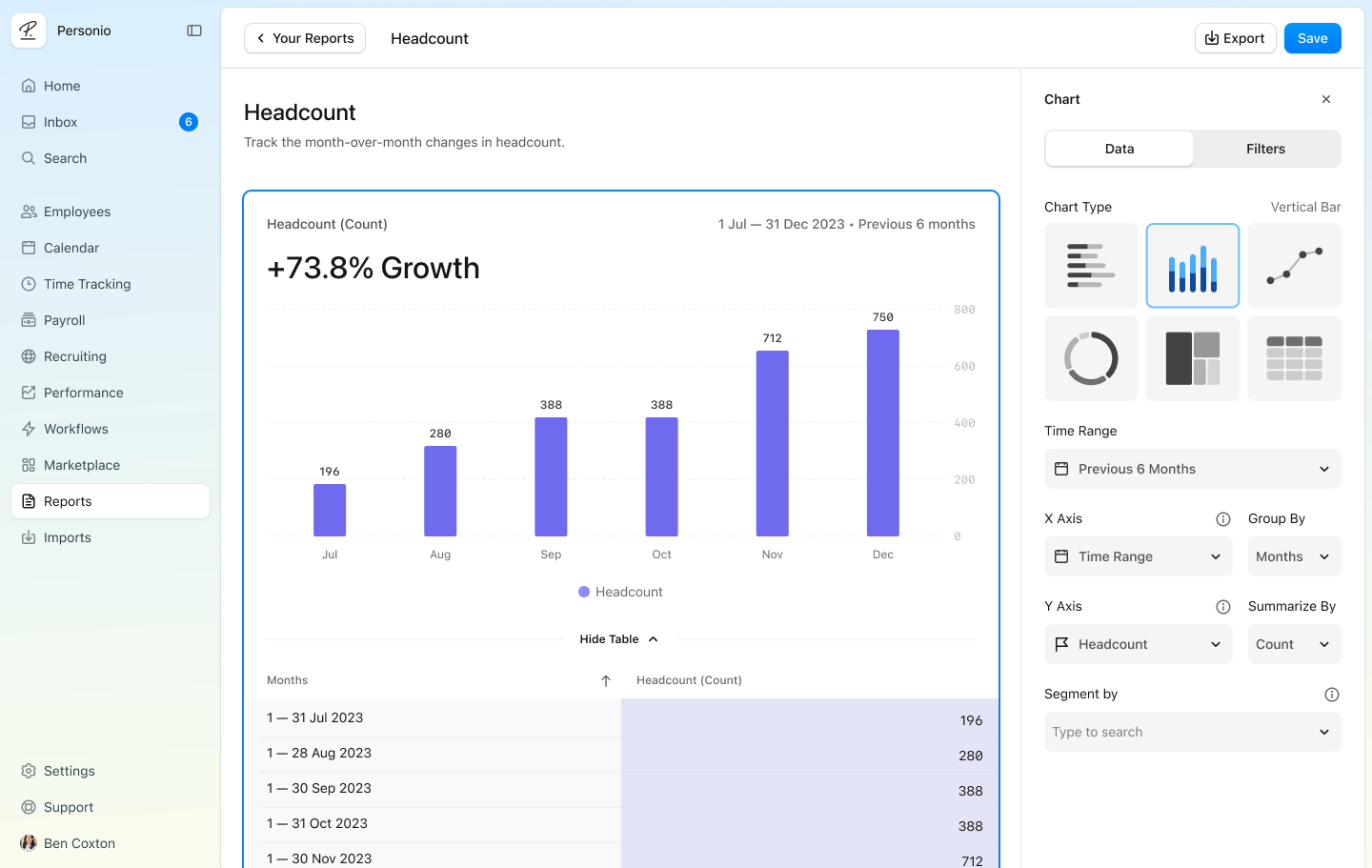
Personio provides People Analytics with templated and customised reporting. For organisations that primarily need a dedicated HR analytics environment, that can be a strong fit.
HRManagement365 becomes particularly relevant when Power BI already forms part of the organisation's reporting strategy and appropriate workforce information needs to sit alongside finance, operational or other Microsoft-governed data.
The architectural argument only matters if the HR product also meets the HR requirement.
Personio has broad, credible HR functionality. HRManagement365 should therefore win Microsoft-first opportunities by combining the required HR capability with a more strategically relevant Microsoft architecture—not by pretending Personio lacks standard HR functions.
Core HR & personnel files
Both support structured employee data and documents. Compare permissions, history, document handling, auditability and the downstream use of employee information.
Employee self-service
Both reduce routine HR administration. Compare where employees perform tasks, what they can update, and how actions connect to the rest of the organisation.
Recruitment
Personio has a strong dedicated recruiting application. HRManagement365 connects recruitment into its wider employee lifecycle and Microsoft-oriented process architecture.
Onboarding
Both support structured onboarding. Test a complete starter scenario that involves HR, the manager, IT, finance, documents and training—not an empty onboarding dashboard.
Leave & absence
Both provide leave/absence processes. The differentiator may be where absence information must go afterwards: scheduling, finance, reporting or another Microsoft workflow.
Time & attendance
Both have meaningful time functionality. Ask what happens after hours are approved and how that information becomes useful to payroll, projects, finance and operations.
Performance
Both support performance and development processes. Personio has a dedicated Performance & Development application; HRManagement365 connects performance, skills and development into its employee lifecycle.
Training
Compare course management, skills, qualifications, certificates and development records against your exact process rather than relying on module names.
Documents & e-signatures
Personio includes documents and e-signatures within Core HR. HRManagement365 connects employee documents to the wider employee record and Microsoft-aligned process model.
Give Personio credit where it is due—then inspect the integration boundary.
Microsoft Teams
Personio's official Teams integration publishes daily updates including employee time off and return dates, birthdays, company anniversaries and new employees.
That is a real Microsoft integration. The useful evaluation question is whether your required HR action can be completed through the Microsoft experience, or whether Teams is primarily being used to surface information and notifications.
Microsoft Entra ID
Personio supports Microsoft Entra ID SSO and has an official employee synchronisation integration. Personio's current documentation describes that synchronisation as Personio-to-Entra and notes limitations including no write-back from Entra into Personio.
That may be entirely sufficient. For your architecture, document joiner, mover and leaver ownership, attribute direction, error handling and any hybrid identity requirements.
Which platform is more compelling in your situation?
Existing Business Central customer
Give HRManagement365 significant weight. The decision is no longer only an HR software purchase; it affects ERP data ownership, reporting and business process design.
Existing Dynamics 365 customer
Compare the number and type of application boundaries required. HRManagement365 is specifically positioned around Dynamics; Personio can still be viable if the required integrations are straightforward and supported.
Existing Power Platform customer
If you already govern Power Apps, Power Automate, Dataverse and Power BI, HRManagement365 can let those skills and technologies participate in the HR solution.
Microsoft 365-first organisation
Compare user experience, identity, reporting and automation—not just feature availability. Determine whether a separate HR application boundary is strategically acceptable.
Organisation requiring unusual workflows
Ask both suppliers to design one genuinely unusual requirement. Personio may solve it with Workflow Builder/API; HRManagement365 may use standard configuration plus Power Platform where appropriate.
HR must interact heavily with finance and operations
This is one of the strongest HRManagement365 scenarios. When employee changes continually affect finance, projects, resource planning, access and operations, HR architecture becomes a business-application decision.
HRManagement365 powered by Hubdrive is particularly strong when…
- Microsoft is a strategic technology platform for the organisation.
- You use Business Central or other Dynamics 365 applications.
- You already use or govern Power Platform.
- Power BI is a reporting standard.
- HR needs to interact closely with finance or operations.
- You expect organisation-specific workflows or applications.
- You want to reuse Microsoft skills and technology investment.
Personio may be particularly strong when…
- You want a dedicated cloud HR SaaS platform.
- Strong native HR automation and People Analytics are central requirements.
- You want a large marketplace of third-party integrations.
- Recruiting and talent applications are high priorities.
- Your wider business architecture does not need to be closely aligned to Microsoft.
- Microsoft interoperability is useful, but not a defining technology-strategy requirement.
Do not compare implementation duration without comparing implementation scope.
A focused HR SaaS configuration and a broader Microsoft business-application project are not equivalent just because both are called “HR implementations”.
Define ownership
Document the authoritative employee record, organisational structures, identity provider, document ownership, workflow ownership and reporting architecture.
Design integrations
For every connection capture source, trigger, data, destination, monitoring and correction owner. If those are unclear, the integration is not fully designed.
Protect upgradeability
Use standard functionality first, configuration second and extensions only where they create enough business value to justify the additional lifecycle responsibility.
Do not start migration with “export everything”. Start with why you are changing.
Potential migration scope
- Employee profiles and organisational structures
- Documents and relevant history
- Leave and working-time records
- Recruitment and onboarding information
- Performance and training information
- Permissions, workflows and reporting requirements
- Payroll and integration dependencies
A better switching sequence
- Define the outcome the current platform cannot achieve satisfactorily.
- Map current Personio processes and integrations.
- Define systems of record across Microsoft and HR.
- Classify data: migrate, archive, transform or retire.
- Rebuild workflows intentionally rather than cloning legacy process.
- Test high-risk integrations and pilot before full rollout.
Take these questions into both demonstrations.
HR capability
- Which functions are standard?
- Which need add-on modules?
- Which require configuration?
- Which rely on partner development?
Microsoft environment
- Do we use Business Central?
- Dynamics 365?
- Power Platform?
- Power BI?
- How strategic is Microsoft?
Architecture
- Which system owns employee data?
- How many integrations are required?
- How are failures monitored?
- Who supports each boundary?
Extensibility
- Can unusual workflows be changed?
- Can internal skills be reused?
- What requires code?
- What happens during upgrades?
User experience
- Where do employees complete tasks?
- Where do managers approve?
- How many context switches?
- What works on mobile?
Reporting
- Is HR-only analytics enough?
- Do we need Power BI?
- Do finance and HR data need to meet?
- Who governs access?
Personio alternatives and Microsoft HR software: common buying questions
What is the best Personio alternative for a Microsoft organisation?
HRManagement365 deserves serious consideration when Microsoft already forms an important part of the organisation's technology strategy. Personio is a capable HR platform, but HRManagement365 is specifically designed around Microsoft Power Platform, Microsoft 365 and defined Dynamics scenarios. The deeper your Microsoft investment, the more significant that architectural difference becomes.
Is HRManagement365 an alternative to Personio?
Yes. The platforms overlap across major HR processes including employee administration, recruitment, onboarding, absence, time, performance, development, workflow and reporting. The most important difference for many buyers is how each platform fits the organisation's wider technology architecture.
How does HRManagement365 compare with Personio?
Personio is a dedicated cloud HR platform with strong native HR applications, automation, analytics and an extensive integration marketplace. HRManagement365 combines broad employee-lifecycle HR with an architecture deliberately aligned to Microsoft technologies and Dynamics business applications.
Is Personio suitable for Microsoft organisations?
Yes. Personio has official Microsoft integrations, including Teams and Microsoft Entra ID. The key question is whether those integrations satisfy your target architecture or whether your organisation gains more value from an HR platform designed around the Microsoft ecosystem itself.
Does Personio integrate with Microsoft Teams?
Yes. Personio's official Teams integration can publish Personio-related updates including time off, birthdays, company anniversaries and new employees into Teams.
Does Personio support Microsoft Entra ID?
Yes. Personio supports Microsoft Entra ID for single sign-on and provides an official employee synchronisation integration. Personio's current documentation describes the automatic employee-information synchronisation as Personio-to-Entra, so validate direction, attributes and lifecycle requirements against your identity design.
Does Personio integrate with Business Central?
Personio provides APIs and a broad integration ecosystem, so a Business Central integration may be possible depending on the required process and available integration route. Do not assume equivalence: ask Personio to demonstrate the exact Business Central process, system ownership, monitoring and support model you require. HRManagement365 has a dedicated Business Central proposition.
What HR software works with Business Central?
HRManagement365 is specifically designed for organisations operating in the Microsoft environment and has a dedicated Business Central proposition. The right solution still depends on required HR processes, data ownership, integrations, reporting and ERP architecture.
Is there an HR system built around Microsoft Power Platform?
Yes. HRManagement365 is built around Microsoft Power Platform and the wider Microsoft business-application environment. That creates routes for Power Apps, Power Automate, Dataverse and Power BI to participate in the solution where appropriate.
Can HR workflows use Power Automate?
Yes. Power Automate can automate processes across Microsoft applications and services. With HRManagement365, it can form part of the wider extension approach when an HR workflow needs to interact with other systems or departments.
Can HR reporting use Power BI?
Yes. HRManagement365 can use Microsoft reporting technologies including Power BI. Personio also provides strong native People Analytics, so the decision is whether you primarily need dedicated HR analytics or want workforce information to participate in the organisation's wider Power BI reporting architecture.
Is HRManagement365 customisable?
Yes, within a governed implementation approach. Start with standard functionality and configuration, then use workflow changes, Power Platform extension routes and specialist development where the business requirement justifies it. This should not be interpreted as unlimited or effort-free customisation.
Can Personio be customised?
Yes. Personio supports configurable fields, permissions and workflows, plus integrations and APIs. It should not be characterised as a rigid product. The relevant comparison is what happens when requirements extend beyond the standard Personio application boundary.
Personio vs Microsoft HR software: which is better?
There is no universal winner. Personio is compelling when you want a dedicated European HR SaaS platform with strong native HR functionality. HRManagement365 becomes more compelling as your organisation's Microsoft investment increases and HR needs to participate in Microsoft identity, workflow, reporting, Dynamics or Power Platform processes.